Chapter 01 · Watch, then practise
Introduction to Operating System
Watch the related lecture, then read the question and answer below.
9 questions · 8 playlist videos. Matches are based on video titles; broader background matches are labeled.
Open the full chapter playlist ↗Gate Smashers · 18:59
Topic match: operating-system purposes and functions.
1. Purpose of an operating system
What are the primary purposes of an operating system? Why should an operating system prevent users from accessing "boot access"?
Needs review: The first sentence is written as "Why are the primary purpose of operating system" in the scan; it is normalized above to "What are the primary purposes." The second sentence appears to say "boot access." This wording is retained rather than silently changed to "root access" or another interpretation.
Answer
The primary purposes of an operating system are:
- To provide an environment for a computer user to execute programs on computer hardware in a convenient and efficient manner.
- To allocate the separate resources of the computer as needed to solve the given problem. The allocation process should be as fair and efficient as possible.
As a control program, it serves two major functions:
- Supervision of the execution of user programs to prevent errors and improper use of the computer.
- Management of the operation and control of I/O devices.
Source gap: The handwritten answer does not separately address the question about "boot access."
5 Minutes Engineering · 7:49
5 Minutes Engineering · 6:20
5 Minutes Engineering · 4:43
Topic matches for several OS types. The playlist does not separately list a network-OS lecture.
2. Types of operating systems
Explain the various types of operating systems.
Answer
The various types of operating systems are:
i. Batch processing
In a batch processing system, similar jobs consisting of programs, data, and system commands are grouped together. Instructions, data, and some control information are submitted to the computer operator in the form of a job. Users are not allowed to interact with the computer system. Jobs are performed in FIFO order, so the OS requires very simple CPU scheduling techniques.
The problems in this system are:
- Lack of interaction between the user and the job.
- The CPU is often idle because mechanical I/O devices are slower than the CPU.
- Difficulty in providing the desired priority.
ii. Multiprocessing
A computer's capability to process more than one task simultaneously is called multiprocessing. A multiprocessing operating system is capable of running many programs simultaneously, and most modern network operating systems (NOSs) support multiprocessing. These operating systems include Windows NT, Windows 2000, Windows XP, and UNIX.
Advantages
- Increased throughput.
- Increased economy of scale.
Disadvantages
- If one processor fails, it affects the speed.
- Multiprocessor systems are expensive.
- A complex OS is required.
- Large main memory is required.
iii. Time-sharing operating system
It is a technique that enables many people located at various terminals to use a particular system at the same time. Time-sharing, or multitasking, is a logical extension of multiprocessing. Processor time shared among multiple users simultaneously is termed time-sharing.
Source terminology: The scan says "multiprocessing" in the preceding explanation; this has been retained rather than silently changed to "multiprogramming."
Advantages
- Provides a quick response.
- Avoids duplication of software.
- Reduces CPU idle time.
Disadvantages
- Reliability problems.
- Questions of security and integrity of user programs and data.
- Data communication problems.
iv. Real-time system
A real-time system is defined as a data processing system in which the time interval required to process and respond to inputs is so small that it controls the environment. It is a multitasking operating system that aims to execute real-time applications.
It is of two types:
- Hard real-time system: Guarantees that critical tasks complete on time.
- Soft real-time system: Is less restrictive.
v. Network operating system
A network OS runs on a server and provides the server with the capability to manage data, users, groups, security, applications, and other networking functions. Its primary purpose is to allow shared file and printer access among multiple computers in a network.
It is further divided into two types:
- Peer-to-peer: Allows users to share resources and files located on their computers and to access shared resources on other computers.
- Client/server: Allows the network to centralize functions and applications in one or more dedicated file servers. Examples: Novell NetWare and Windows 2000 Server.
vi. Distributed operating system
A distributed OS is an operating system that runs on several machines. Its purpose is to provide a useful set of services, generally to make the collection of machines behave more like a single machine.
Advantages
- Sharing of resources.
- Reliability.
- Communication.
- Computational speedup.
Neso Academy · 19:27
Neso Academy · 11:23
Topic matches for OS structures and virtual machines.
3. Operating system structure
Explain the structure of an operating system with its advantages and disadvantages.
Answer
The common system structures are:
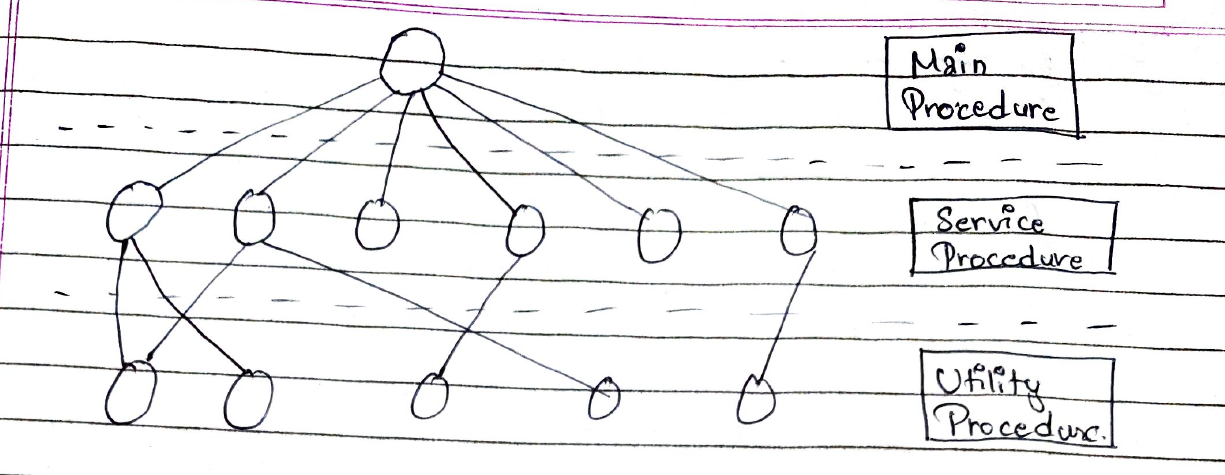
i. Monolithic
- The kernel is a single large program.
- Functionality of the OS is invoked with simple function calls within the kernel.
- Device drivers are loaded into the running kernel and become part of the kernel.
- System calls from user programs are kept in a trap table and executed in kernel mode, switching from user mode.
Original figure: Main procedure, service procedures, and utility procedures.
ii. Layered structure
- A hierarchy of layers, each constructed upon the layer below it.
- Layer 0 is hardware; layer N is the user interface.
- Provides modularity.
- Layers are selected so that each uses the functions, operations, and services of only lower-level layers.
- Differentiation is difficult, and the structure is less efficient.
- The first system constructed in this way was "THE SYSTEM."
- "THE SYSTEM" was a simple batch system consisting of six layers.
The six layers are listed in the source as:
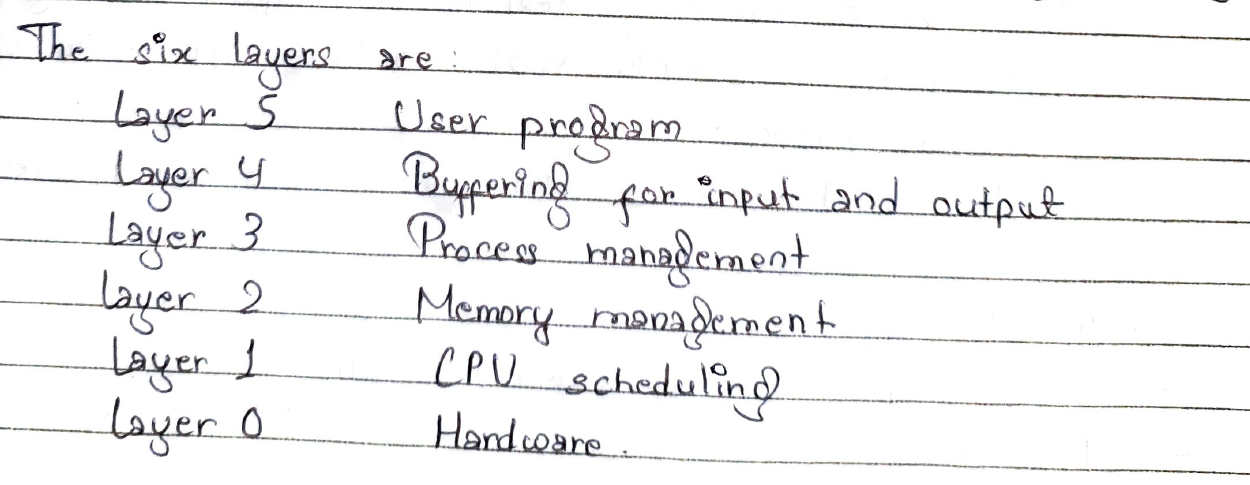
Searchable transcription:
| Layer | Function |
|---|---|
| 5 | User program |
| 4 | Buffering for input and output |
| 3 | Process management |
| 2 | Memory management |
| 1 | CPU scheduling |
| 0 | Hardware |
Source fidelity: This table reproduces the handwritten layer labels; it has not been independently validated as a description of THE system.
iii. Microkernel
- The basic idea is to achieve high reliability by splitting the OS into small, well-defined modules.
- Only one of these modules always resides in memory and always runs in kernel mode.
- Others run as user processes, such as device drivers and the file system.
Advantages
- Easier to extend a microkernel.
- Easier to port the OS to a new architecture.
iv. Client-server architecture
- Two classes of processes: server and client.
- Communication between client and server is via message passing.
- Client and server can run on different computers connected by LAN/WAN.
- Servers run in user mode. Hence, the system does not go down if the server crashes.
- Well adapted to distributed systems.
v. Virtual machine
- It creates the illusion of a real machine, making a single real machine appear to be several real machines.
- In this system, each user can choose a different OS.
Advantages
- Complete protection of system resources.
- No direct sharing of resources.
Disadvantage
- Difficult to implement.
Gate Smashers · 18:59
Background video on OS functions; its title does not specifically identify user and system views.
4. Views of an operating system
Explain the views on an operating system.
Answer
The views on an operating system are:
a. User view
The user view depends on the system interface used by the users.
- If the user is using a personal computer, the operating system is largely designed to make interaction easy.
- If the user is using a system connected to a mainframe computer or a minicomputer, the operating system is largely concerned with resource utilization.
- If the user is on a workstation connected to other workstations through networks, the OS needs to focus on both individual resource usage and sharing through the network.
- If the user is using a handheld computer such as a mobile device, the OS handles the usability of the device, including some remote applications.
Source heading: The scan labels this subsection "User mode," although its explanation discusses the user view. The heading is normalized here to match the question and answer text.
b. System view
According to the computer system, the OS is the bridge between applications and hardware.
- The system views the OS as a resource allocator.
- The OS can also work as a control program.
- The OS can be viewed as a way to make hardware easier to use.
- Operating systems were developed to communicate easily with hardware.
Gate Smashers · 10:07
Topic match: system calls and their types.
5. System calls
Define system calls. Illustrate the working of a system call with an appropriate example.
Answer
A system call is how a program requests a service from an operating system's kernel. This may include hardware-related services, creating and executing new processes, and communicating with integral kernel services. A system call provides an essential interface between a process and the operating system.
For example:

Normalized text transcription:
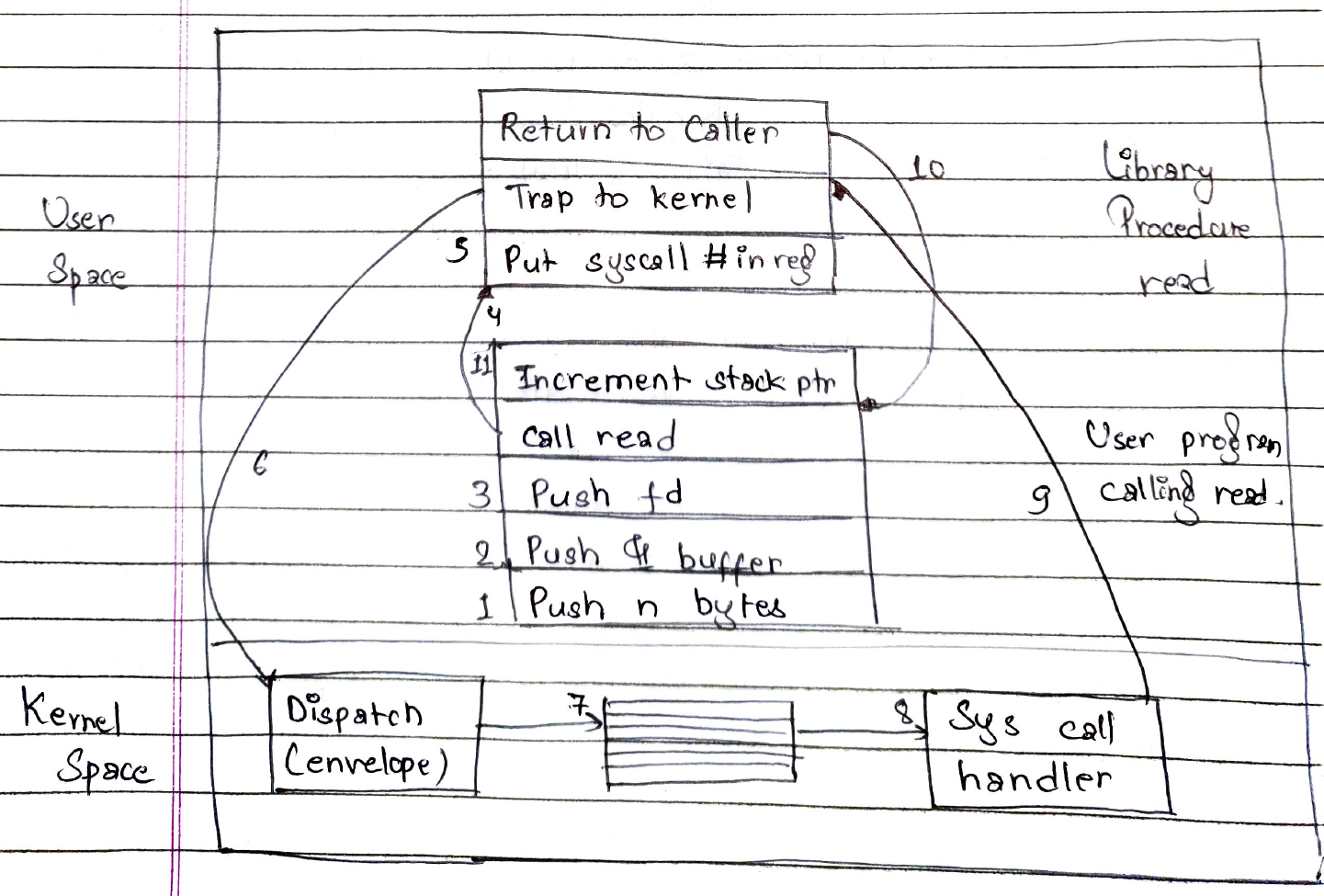
read(fd, buffer, nbytes);
The system call returns the number of bytes actually read in count. This value is normally the same as nbytes, but may be smaller if, for example, end-of-file is encountered while reading.
Working shown in the source diagram
The following sequence transcribes the numbered arrows and labels in the drawing:
- Push
nbytes. - Push the buffer address (
&bufferin the drawing). - Push
fd. - Call the library procedure
read. - Put the system call number in a register.
- Trap to the kernel; enter the dispatch block.
- Use the dispatch table.
- Invoke the system call handler.
- Return to the library procedure.
- Return to the caller.
- Increment the stack pointer.
The drawing separates user space (the user program and library procedure) from kernel space (dispatch, the table, and the system call handler).
Gate Smashers · 18:59
Background only. No dedicated shell-and-kernel video is listed in this chapter playlist.
6. Shell and kernel
Define shell and kernel along with their functions.
Answer
Shell and kernel
When a user gives a command to perform an operation, the request goes to the shell. The shell is also called the interpreter, which translates the human program into machine language, and then the request is transferred to the kernel. Thus, the shell is an interpreter of commands that converts the user's request into machine language.
Source wording: The description of the shell as translating programs into machine language is present in the handwritten answer. It is transcribed here, not endorsed as a technically precise definition.
Functions of the kernel
- Controls the state of a process, checking whether it is running or waiting for a user's request.
- Provides memory for the processes running on the system; the kernel performs allocation and deallocation.
- Maintains a timetable for all running processes.
Neso Academy · 11:23
Related background on virtualization and OS functions; not a verified solution to this question.
7. Operating system abstraction
"An operating system provides abstraction." Justify.
Answer
An operating system provides a set of basic commands or instructions to perform operations such as read, write, modify, save, or close. Working with them is easier than dealing directly with hardware. Thus, the operating system hides the complexity of hardware and presents an interface to the user.
Just as the operating system shields the programmer from disk hardware and presents a simple file-oriented interface, it also conceals much of the unpleasant business concerning interrupts, memory management, and other low-level factors. In each case, the abstraction offered by the operating system is simpler and easier to understand than that offered by the underlying hardware.
Gate Smashers · 18:59
Related background on OS functions; coverage of every component has not been verified.
8. Components of an operating system
Explain the various components of an operating system.
Answer
The components of an operating system are:
i. Process management (scheduling)
A process is the unit of work in a system. The operating system manages the execution of these processes. It is responsible for the following activities in connection with process management:
- Creation and deletion of both user and system processes.
- Suspension and resumption of processes.
- Provision of mechanisms for process synchronization.
- Provision of mechanisms for deadlock handling.
ii. I/O management
One of the important jobs of an OS is to manage various I/O devices. The I/O system takes an application's I/O request and sends it to the physical device, then takes the response from the device and sends it to the application.
iii. Main memory management
The operating system is responsible for:
- Keeping track of which parts of memory are being used.
- Deciding which processes are to be loaded into memory when space becomes available.
- Allocating and deallocating memory space as needed.
iv. Secondary storage management
The operating system is responsible for the following activities in connection with disk management:
- Free-space management.
- Storage allocation.
- Disk scheduling.
v. File management system
The operating system is responsible for:
- Creation and deletion of files.
- Creation and deletion of directories.
- Support of primitives for manipulating files and directories.
- Mapping files onto disk storage.
- Backup of files on stable storage.
vi. Security and protection
The various processes in an OS must be protected from each other's activities. For that purpose, various mechanisms can be used to ensure that files, memory segments, the CPU, and other resources can be operated on by processes that have gained proper authorization from the operating system.
No dedicated Windows, UNIX, or Linux video is listed in the supplied chapter playlist.
9. Short notes
Write short notes on:
- (a) Windows
- (b) UNIX
- (c) Linux
Answer
a. Windows
Windows is a personal computer operating system from Microsoft Corporation that comes with some commonly used applications. Windows has become a "standard" for common users in most organizations and homes. Microsoft Windows is a series of operating systems and graphical user interfaces produced by Microsoft.
The final sentence appears to read: "Microsoft first introduced an operating environment named Windows 20 MS-DOS."
Needs review: The words between "Windows" and "MS-DOS" are unclear in the scan. The apparent "20" above is a tentative transcription, not a verified version number or historical claim.
b. UNIX
UNIX is a computer operating system originally developed in 1969 by a group of AT&T employees at Bell Labs.
UNIX was originally meant to be a convenient platform for programmers developing software to run on it and on other systems, rather than for non-programmers.
Under UNIX, the operating system consists of many libraries and utilities along with the master control program, the kernel.
c. Linux
A Linux-based system is a modular Unix-like operating system, deriving much of its basic design from principles established in UNIX during the 1970s and 1980s. Such a system uses a monolithic kernel, the Linux kernel, which handles process control, networking, access to peripherals, and the file system.
Device drivers are either integrated directly with the kernel or added as modules that are loaded while the system is running.